

Administrator Roles
SingleDraft has two special user roles with extra permissions:
- Team Admin
- Data Manager
Team Admin Role
Section titled “Team Admin Role”How to Become a Team Admin
Section titled “How to Become a Team Admin”There are two ways to get Team Admin status:
-
Create a subscription: When you create a subscription and pay the first invoice, you automatically become a Team Admin.
-
Get assigned by another Team Admin: Any existing Team Admin can give this role to other users.
How to Make Someone a Team Admin
Section titled “How to Make Someone a Team Admin”Before you start, make sure:
- You already have the Team Admin role yourself
- You have at least one user in your company subscription
Steps to follow:
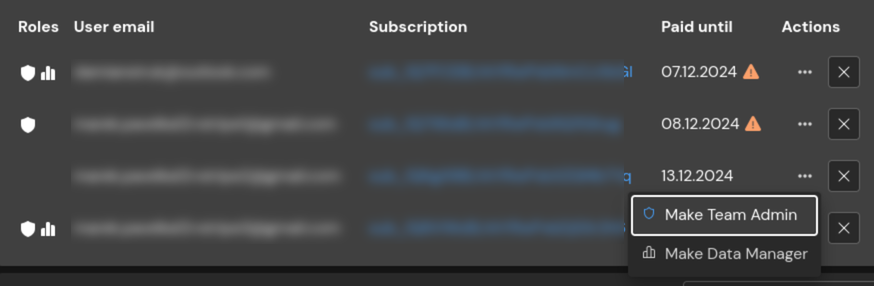
- Go to Settings > Users management
- Click on Your users
- Find the user in the list
- Click the three dots (⋮) in the Actions column
- Select Make Team Admin
What Team Admins Can Do
Section titled “What Team Admins Can Do”Manage Subscriptions:
- Cancel subscriptions they have paid for
- View all company subscriptions
- See all users in each subscription
- Add users to subscriptions
- Remove users from subscriptions
Manage Roles:
- Give the Team Admin role to other users
- Give the Data Manager role to other users
Manage Company Data:
- Set up, change, or remove company secrets (like API keys)
Data Manager Role
Section titled “Data Manager Role”How to Become a Data Manager
Section titled “How to Become a Data Manager”Ask any Team Admin in your company to give you this role.
How to Make Someone a Data Manager
Section titled “How to Make Someone a Data Manager”Before you start, make sure:
- You already have the Team Admin role yourself
- You have at least one user in your company subscription
Steps to follow:
- Go to Settings > Users management
- Click on Your users
- Find the user in the list
- Click the three dots (⋮) in the Actions column
- Select Make Data Manager
What Data Managers Can Do
Section titled “What Data Managers Can Do”Manage Company Settings:
- Set up, change, or remove company settings (like system prompts)