Troubleshooting
Office 365 Privileges
Section titled “Office 365 Privileges”If you cannot see Admin section in Microsoft 365 account it means you do not have
sufficient rights. Please refer to this
Microsoft webpage
for full set of requirements for adding Microsoft Add-in into Integrated Apps.
Office 365 License
Section titled “Office 365 License”Only Business and Enterprise licenses support adding Microsoft Add-in into Integrated Apps. Please refer to this Microsoft webpage for a full set of requirements for adding Microsoft Add-in into Integrated Apps.
Add-ins Icon Not Visible
Section titled “Add-ins Icon Not Visible”It can happen that your Microsoft Word customization does not have Add-ins button at
the Home tab of the Microsoft Word.

-
When you have any Microsoft Word document open, click on
File.
-
This will open side bar, select
Get Add-ins.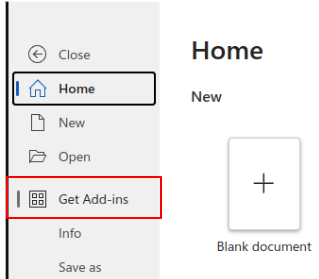
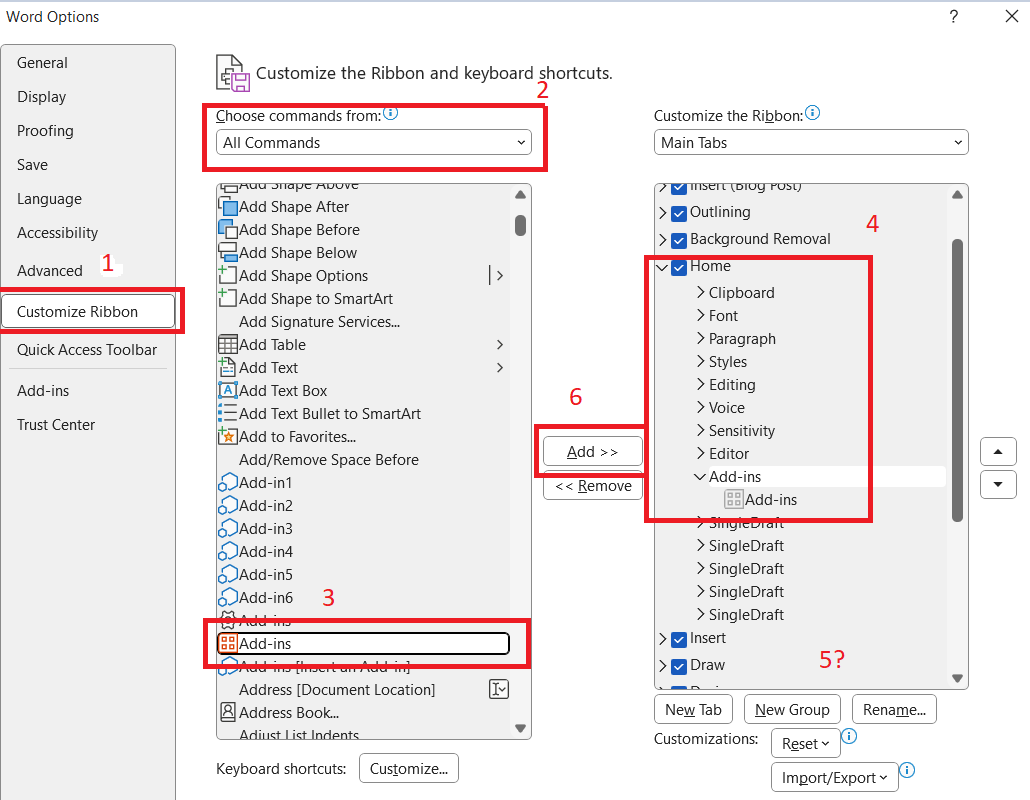
In case you do not see this icon either, please follow these steps:
- Click on
Fileagain - At the bottom of the sidebar there is
Options - This will open new window
- Click on
Customize Ribbon - Add Add-ins to
Hometab